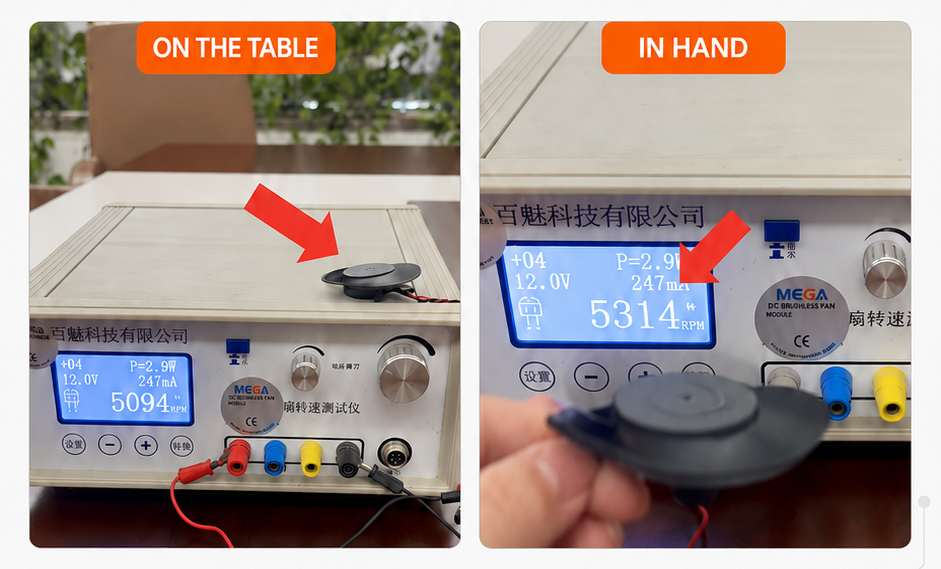
A few weeks ago one of our clients called us pretty concerned. They’d been testing a custom bracket axial fan we built for them, and it was only hitting 4,900 RPM. The spec sheet said 5,300 RPM. That’s not a small gap, and understandably, they wanted answers.
On our side, every unit from that batch had been tested internally and hit 5,300 RPM without issue. So rather than assuming something had gone wrong on the production floor, our team sat down with the customer and walked through exactly how they were testing the fan. It turned out to be a great reminder of how easy it is to get a misleading RPM reading, even when the fan itself is working perfectly.
Here’s what we found, and what we’d recommend to anyone testing a cooling fan at their own bench.
Table of Contents
ToggleGive the fan time to warm up
This one catches a lot of people off guard. Fans built with a hydraulic bearing (sometimes called an FDB, or fluid dynamic bearing) don’t reach full speed the moment power hits them. The bearing needs a few minutes for the internal fluid to distribute properly and settle into a stable state.
We generally tell customers to let the fan run for 3 to 5 minutes before taking a real RPM reading. If you check it right after power-on, you’re very likely to see a number lower than what the fan is actually capable of. It’s not a defect, it’s just not warmed up yet.
Make sure nothing is blocking the airflow
The second issue was simpler, but just as easy to miss. We asked the customer to send over a short video of their setup, and the problem was obvious within a few seconds. The fan was sitting flat on a desk, face down, with the outlet completely sealed against the table surface.
An axial fan needs open air on both sides to move air the way it’s designed to. Block the outlet (or the inlet), and the motor is fighting against trapped pressure instead of spinning freely. The RPM drops as a result, and it can drop quite a bit.
If you’re testing a fan on a workbench, hold it up in open air, or set it on a stand or bracket so both faces are clear, the same way it would actually sit once installed in the final product.
What happened after the fix
Once the customer retested with the fan properly warmed up and the airflow unobstructed, they got 5,300 RPM, right in line with the spec sheet. No defect, no bad batch, nothing wrong with the hardware at all. Just two small testing habits that made a real difference in the reading.
We share this not to point fingers (these are genuinely easy things to overlook) but because we run into this exact scenario more often than you’d think, and it’s a quick fix once you know what to look for.
A short checklist before you test any cooling fan
- Let it run 3 to 5 minutes if it has a hydraulic bearing, don’t judge the first reading
- Keep both the inlet and outlet completely clear of desks, walls, packaging, anything
- Double check you’re supplying the correct rated voltage
- Aim your tachometer at a proper reference point on the hub, not the blur of the blades
- Compare your result to free-air RPM specs, not RPM inside an enclosure or duct
- Note the ambient temperature if the fan has thermal speed control built in
Why we think this matters
If you’re an engineer or a procurement lead sourcing custom AC, DC, or EC axial fans for an OEM or ODM build, testing methodology really is just as important as the fan itself. A fan that “seems” underpowered can trigger unnecessary returns, delays, or a lost sense of trust with a supplier, when the actual fix might take five minutes.
If you’re working through a similar RPM question on a custom bracket fan or anything else in your build, our engineering team is glad to look at your test setup with you, the same way we did here.
Common questions we get on this topic
Why does my hydraulic bearing fan read low right after I power it on? It hasn’t stabilized yet. Give it 3 to 5 minutes and test again before drawing any conclusions.
Can I just test a fan while it’s sitting flat on a table? Not accurately, no. That blocks one side of the airflow path and will drag your RPM reading down no matter how good the fan is. Furthermore, when a fan is installed on a heatsink in actual applications, the resulting load and airflow resistance may also cause the actual RPM to be slightly lower than the specification sheet, which is entirely within the normal range.
How far off from the spec sheet is considered normal? Most manufacturers, us included, build in a tolerance range around the rated RPM, often around plus or minus 10 percent. If you’re still well outside that after fixing warm-up and airflow, it’s worth flagging to your supplier.
Does this apply to blower fans too, or just axial fans? Both. Any axial, blower, or centrifugal fan needs clear airflow to hit its rated numbers, and any fan built with a hydraulic bearing benefits from the same warm-up time.